Krisp vs Otter.ai: Noise Removal Tool or Otter AI Alternative?
Krisp vs Otter.ai is two fights on one card: audio cleanup and meeting notes. Here is who takes which, and why.
Krisp vs Otter.ai is two fights on one card. On audio, Krisp wins by walkover: it cleans your microphone and your speakers live, and Otter's pricing page lists no noise removal on any plan. On transcripts and meeting notes, it's a real contest, and Otter holds the one thing Krisp gave up: a $0 Basic tier that renews every month, with 300 transcription minutes per user and a 30-minute cap per conversation. Facts as of 9 and 10 Oct 2026, read from krisp.ai/pricing and otter.ai/pricing.
So, is Krisp an Otter AI alternative? Yes, if you also want quieter calls, or you'd rather no bot joined the meeting. Stay with Otter if transcription is the whole job and its $0 allowance covers your month.
Corner cards: what each product actually is
Red corner: Krisp
Krisp started as live noise cancellation and has since rebuilt itself as a meeting assistant. On macOS 14+ and 64-bit Windows 10 or 11, its desktop app installs a pair of virtual devices (Krisp Microphone, Krisp Speaker) and cleans audio on your own machine in both directions. The Core plan adds an AI note-taker that records meetings without a bot joining, plus transcripts, audio and video capture, AI-written notes and action items, an hour a day of accent conversion and 10 GB of storage. There's no renewing $0 option. The trial lasts 7 days without a card; after it, Core costs $8 per user per month on an annual plan, or $16 paid monthly.
Blue corner: Otter.ai
Otter is a transcription and meeting-notes service. Its notetaker joins Zoom, Microsoft Teams and Google Meet "to automatically write and share notes", and that feature is listed on every plan from Basic up. The plans are Basic, Pro, Business and Enterprise, and they differ mainly in minutes: how much you can transcribe a month, how long one conversation can run, and how many recorded files you can import.
Two fights, side by side
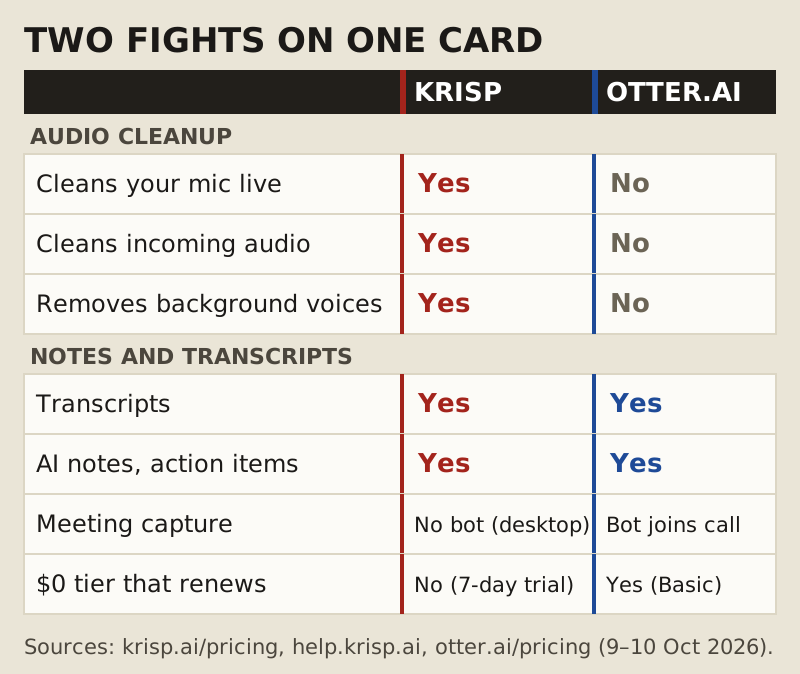
The grid makes the point faster than any paragraph could. The top three rows are a job Otter doesn't take on at all, and the bottom rows are where the two products actually meet. If a comparison you read elsewhere mixes the two fights together, or describes a no-cost Krisp plan, check its date: Krisp's own pricing page, read on 9 Oct 2026, shows no such plan.
What Krisp turned into
If you last looked at Krisp a couple of years ago, you remember a noise remover with a small free allowance. That product is gone. Krisp's pricing page now sells "Meeting AI", and the noise cancellation sits inside plans whose headline features are the note-taker, recording and transcription. Core bundles unlimited noise cancellation with the unlimited note-taker, an hour a day of accent conversion, integrations with HubSpot, Slack, Notion, Zapier, Teams and Pipedrive, and the mobile app with an outbound phone call recorder.
That pivot is exactly why this bout exists. Krisp now competes with Otter for the same line in a budget, while still doing a job Otter never offered. It also explains why an older comparison can mislead you: anything written about the old product describes pricing and a free allowance that no longer exist.
Round 1: noise and voice cleanup
This round is over before it starts. Krisp cleans what you send through Krisp Microphone, cleans what you hear through Krisp Speaker, removes nearby background voices with its Voice Isolation feature, and runs echo cancellation by default. All of it runs live and locally, ahead of whichever call app you open. Otter's pricing page describes no noise reduction or cancellation on any plan. The closest feature it lists is "skip silence", a playback speed option on Pro and above that jumps over quiet stretches of a recording.
Otter doesn't answer the bell for round 1, so Krisp takes it by walkover. That's not a criticism of Otter. It's a transcription service, and nobody faults a stenographer for not soundproofing the room.
Round 2: transcripts and summaries
Here the contest is real, and I won't pretend to settle it with a listening test I haven't run. Both corners record, transcribe and summarise meetings, and both turn out notes and action items. What I can compare is the published allowance. Krisp Core lists its note-taker as unlimited. Otter's allowance depends on the plan: Basic gives 300 transcription minutes per user a month with a 30-minute cap per conversation, Pro gives 1,200 minutes with a 90-minute cap, and Business lifts monthly meeting minutes to unlimited with a 4-hour cap per conversation.
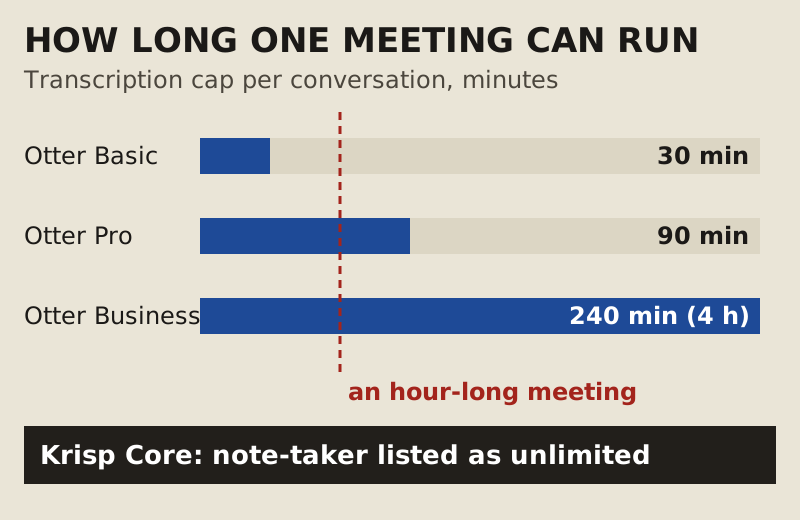
That 30-minute cap on Otter Basic is the number to remember. An hour-long weekly meeting runs past it every time. Basic also allows only 3 imported files per user, for life, so it isn't built to transcribe a backlog of old recordings. On accuracy and summary quality I'm calling this round even, because neither vendor publishes figures I could put on a card and I haven't measured them.
A month of meetings, worked through
Allowances only mean something against a real calendar, so here's one. Say you sit in four hour-long calls a week. That's about 16 hours of meetings a month, using four weeks to the month to keep the sums clean.
- Otter Basic: 300 minutes covers about five of those calls, and each one stops being transcribed at the 30-minute mark, so in practice you get the first half of ten meetings.
- Otter Pro: 1,200 minutes is 20 hours, which covers all 16, and the 90-minute cap clears an hour-long call with room to spare.
- Otter Business: unlimited meeting minutes, with a 4-hour cap per conversation.
- Krisp Core: the note-taker is listed as unlimited, and the same plan cleans the audio of every one of those calls.
Run your own calendar through the same sum before you pick. A team with two short stand-ups a week may never leave Otter Basic. Someone who lives in long client calls outgrows it in the first week, and from there the real comparison is Otter Pro against Krisp Core, which brings you back to whether you want the noise removal too.
Round 3: bots vs bot-free recording
Otter's notetaker joins the meeting as a participant. Everyone on the call can see it, which some teams prefer, because nobody is recorded without a visible sign. Krisp's desktop note-taker records without a bot in the room; its mobile app, on the other hand, works by sending a Krisp bot into Zoom, Meet or Teams. So "bot-free" applies to Krisp on the desktop, not everywhere.
If an extra square in the participant grid annoys your clients, Krisp takes this round. A warning from the referee's chair, though: bot-free doesn't mean consent-free. Tell people you're recording, whichever tool you use, because the absence of a bot means nobody else will tell them.
Round 4: price after the free stuff runs out
Otter takes this round on the only number I can verify on both sides: $0. Basic renews monthly, and if 300 minutes and 30-minute conversations cover your month, you never pay. Krisp's trial opens the premium features for 7 days without a card; after that, access stops until you buy Core or Advanced, and you have 90 days to export what you recorded.
Once both are paid, I can't score it fairly yet. Krisp Core is $8 per user per month on annual billing or $16 paid monthly, with Advanced at $15 or $30 on the same terms. Otter's paid prices are on its pricing page, but I couldn't confirm the US figures on the day I read it, so they aren't on this card. Put the two pricing pages side by side yourself, and remember that only one of them includes noise cancellation.
The decision
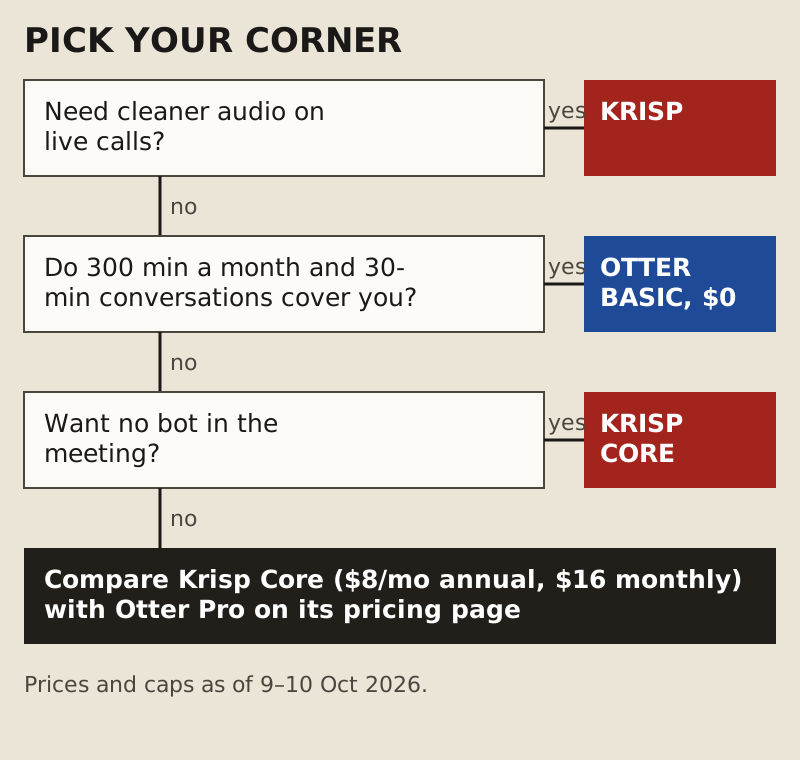
On my card, Krisp takes rounds 1 and 3, Otter takes round 4, and round 2 is even. On the totals that reads like a Krisp win, but it isn't one, because round 1 is a walkover in a weight class Otter never entered. The honest verdict is a split decision by job.
Krisp is the Otter alternative for you if your calls suffer from noise, voices or echo, you want notes from the same app that cleans the audio, or you'd rather no bot sat in the meeting. Otter remains the better pick if you never need audio cleanup and its $0 allowance covers you, or if your team actually wants a visible notetaker in every call.
Flip the card: running both
The two tools don't have to fight. Krisp Microphone is an input device, and Otter's notetaker records what the meeting platform hears, so a meeting where you've selected Krisp Microphone carries your cleaned voice into Otter's transcript. That's a combination of two subscriptions, though, and if you pay for Krisp Core you're already paying for a note-taker. Run both only if Otter's notes are wired into the rest of your team's workflow.
Edge cases
In-person meetings
Both corners record rooms as well as calls. Krisp's mobile app records and transcribes in-person meetings and voice notes, and Otter's minutes cover recordings too. Neither cleans a noisy café in real time on a phone, and live noise cancellation from Krisp stays on the desktop, with one exception: its iOS app cleans outgoing calls to US numbers dialled from inside the app.
Linux and Chromebooks
Krisp's desktop app has no Linux or ChromeOS build, so its noise cancellation is off the table there. Otter's notetaker joins the call as a participant, so capturing the meeting doesn't depend on a desktop app being installed on your machine.
Sales teams on Salesforce
Krisp's CRM integrations split by plan. Core connects to HubSpot, Pipedrive and the other tools named above; Salesforce and ConnectWise need Advanced, at $15 per user per month on an annual plan or $30 paid monthly. If your notes have to land in Salesforce, price Advanced, not Core.
Old recordings
If you have a folder of past episodes or interviews to transcribe, look at Otter's import limits before anything else: 3 files for life on Basic, 10 a month on Pro, unlimited on Business. Krisp is built around live meetings, not around uploading a backlog.
Ringside questions
Is Krisp an Otter AI alternative?
Yes, for people who want noise cancellation and meeting notes from one app. Krisp Core includes an unlimited note-taker, transcription and recording alongside live noise removal. It isn't a cheaper alternative if Otter's $0 Basic tier already covers your month, because Krisp has no renewing $0 option.
Is Krisp better than Otter.ai?
At audio cleanup, yes, because Otter doesn't do it. At transcripts and summaries, I've scored it even: both produce notes and action items, and I haven't measured accuracy. Pick on the job you need done, not on which brand sounds bigger.
Does Otter.ai remove background noise?
Its pricing page lists no noise reduction or noise cancellation on any plan, as of 10 Oct 2026. It lists "skip silence", which skips quiet parts during playback on Pro and above. That's a listening convenience, not noise removal.
Does Krisp join meetings as a bot?
Not on the desktop: Krisp's note-taker there records without a bot in the call. The mobile app is different. It sends a Krisp bot into Zoom, Google Meet or Teams to capture the meeting, rather than working through virtual audio devices the way the desktop app does.
How long is the Krisp trial, and what happens after?
Seven days of the premium features, no card. When it ends without a purchase, access stops, and Krisp's Terms of Use give you 90 days to export your recordings and notes. After that, Core costs $8 per user per month on an annual plan, or $16 if you pay monthly.